
FileMancer by MollieSoft1.1.4.0 - Download
You'll be able to download in few seconds.
Publisher Description
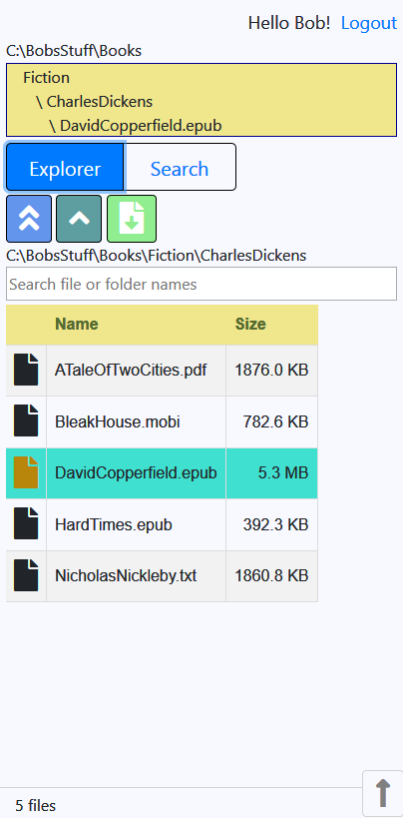
** FileMancer is a FREE utility from MollieSoft that creates a personal website on your computer allowing you to download your files through any web browser, on any device!
** Use FileMancer on an iPad/iPhone to easily load e-books from your PC into iBooks without using USB cables or iTunes. Works on Android devices too!
** There is no complicated Windows IIS (Internet Information Services) setup involved! (FileMancer does not even use IIS.) All the details of creating and running a website are handled transparently inside FileMancer for you. All you have to do is run FileMancer on your Windows computer, create a user, then log in on any device through any web browser.
** No Windows network share is required. Your files are accessible through a web browser, and only to users with a valid login.
** Create any number of separate users, each with his/her own files and settings. For each user, you have complete control over which file types and folders are visible through the website.
** By default, the FileMancer website is only visible within your local router; if desired, you can open a router port to access your files from anywhere on the internet.
** Sounds nice, but why can't I just use a Windows shared folder to transfer files instead? Because Windows shared folders are not visible on an iPad/iPhone without installing special apps. and shared folders cannot be filtered by file types or file names; FileMancer allows you to filter which files are visible on the website.
About FileMancer by MollieSoft
This File & Disk Management program is available in English. It was last updated on 02 November, 2026. FileMancer by MollieSoft is compatible with the following operating systems: Windows.
The company that develops FileMancer by MollieSoft is MollieSoft. The latest version released by its developer is 1.1.4.0.
The download we have available for FileMancer by MollieSoft has a file size of 43.0 MB. Just click the green Download button above to start the downloading process. The program is listed on our website since 2020-07-22 and was downloaded 0 times. We have already checked if the download link is safe, however for your own protection we recommend that you scan the downloaded software with your antivirus. Your antivirus may detect the FileMancer by MollieSoft as malware if the download link is broken.
How to install FileMancer by MollieSoft on your Windows device:
- Click on the Download button on our website. This will start the download from the website of the developer.
- Once the FileMancer by MollieSoft is downloaded click on it to start the setup process (assuming you are on a desktop computer).
- When the installation is finished you should be able to see and run the program.
Program Details
System requirements
Download information
Pricing
Version History
version 1.1.4.0
posted on 2020-07-22
1.1.4.0 - Various stability fixes for search cache; better wait logic in Add/Edit User dialogs.
version 1.1.3.0
posted on 2020-07-14
1.1.3.0 - Make Search more responsive; enable/disable users in Admin; show website status in Admin.
version 1.1.2.0
posted on 2019-07-27
1.1.2.0 - Initial release.
Disclaimer
External Download
We do not host FileMancer by MollieSoft on our servers. We did not scan it for viruses, adware, spyware or other type of malware. This app is hosted by the software publisher and passed their terms and conditions to be listed there. We recommend caution when installing it.
The external download link for FileMancer by MollieSoft is provided to you by apps112.com without any warranties, representations or guarantees of any kind, so access it at your own risk.
If you have questions regarding this particular app contact the publisher directly. For questions about the functionalities of apps112.com contact us.
